Most enterprise systems were not built to talk to each other. They were built to do a specific job, using the communication model that made sense at the time they were designed. Protocol adapter architecture is the engineering discipline that connects these worlds without rewriting either of them. This article explains what protocol adapters are, how they work at a technical level, and why they are the most pragmatic solution to one of the most persistent problems in enterprise integration: the biometric device.
What a Protocol Is and Why It Creates Lock-In
Before understanding protocol adapters, you need a clear definition of what a protocol actually is. In software and hardware communication, a protocol is a set of rules that governs how data is formatted, transmitted, and interpreted between two parties. It defines the packet structure, the connection model, the handshake sequence, the encoding format, and the error handling behaviour.
Protocols create lock-in because they require both parties to speak the same language. If you write software that communicates using Protocol A, it can only communicate with systems that also implement Protocol A. Any system using Protocol B, no matter how functionally similar, is unreachable without a translation layer.
This is not a flaw in protocol design. It is an unavoidable consequence of structured communication. The problem arises when the protocol a device or system uses becomes obsolete relative to the communication standards that the rest of the ecosystem has moved to. The device still works. Its data is still valuable. But its protocol has become a wall.
A biometric fingerprint terminal manufactured in 2010 communicates using a binary TCP protocol defined by its manufacturer. The terminal captures attendance data accurately every day. But the HRMS your company adopted in 2023 communicates via REST and JSON over HTTPS. These two systems share no common protocol. They cannot communicate directly, regardless of how capable either system is individually. The data on the terminal is inaccessible to the HRMS unless something translates between the two protocols.
The SDK as a Protocol Decoder: What It Actually Does
When a biometric device manufacturer cannot expose their device through a standard protocol, they distribute an SDK. Understanding what an SDK actually does at the technical level helps explain both why it exists and why it creates such significant architectural problems.
An SDK, or Software Development Kit, is a collection of compiled code libraries, header files, and documentation that a developer installs on a machine to enable communication with a specific device or service. In the context of biometric devices, the SDK performs two critical functions.
First, it handles the connection layer. The SDK establishes and maintains the persistent TCP socket connection that the device expects. It manages the handshake sequence, keeps the connection alive, and handles reconnection when the device goes offline. This connection management code is complex and entirely specific to the manufacturer’s protocol implementation.
Second, it handles the decoding layer. Every packet the device sends arrives as raw binary bytes. The SDK contains lookup tables, bit masks, and parsing functions that decode these bytes into meaningful data structures that a developer can work with. Without this decoding layer, the binary stream coming from the device is meaningless.
A continuous stream of binary bytes over a persistent TCP socket. The meaning of each byte depends on its position within a packet, the packet type identifier, and the device firmware version. No human-readable structure exists at this layer.
Named function calls and data objects. enrollUser(), getAttendanceLogs(), revokeAccess(). The SDK translates the binary world into a programmatic interface that a developer can call without knowing anything about the underlying wire format.
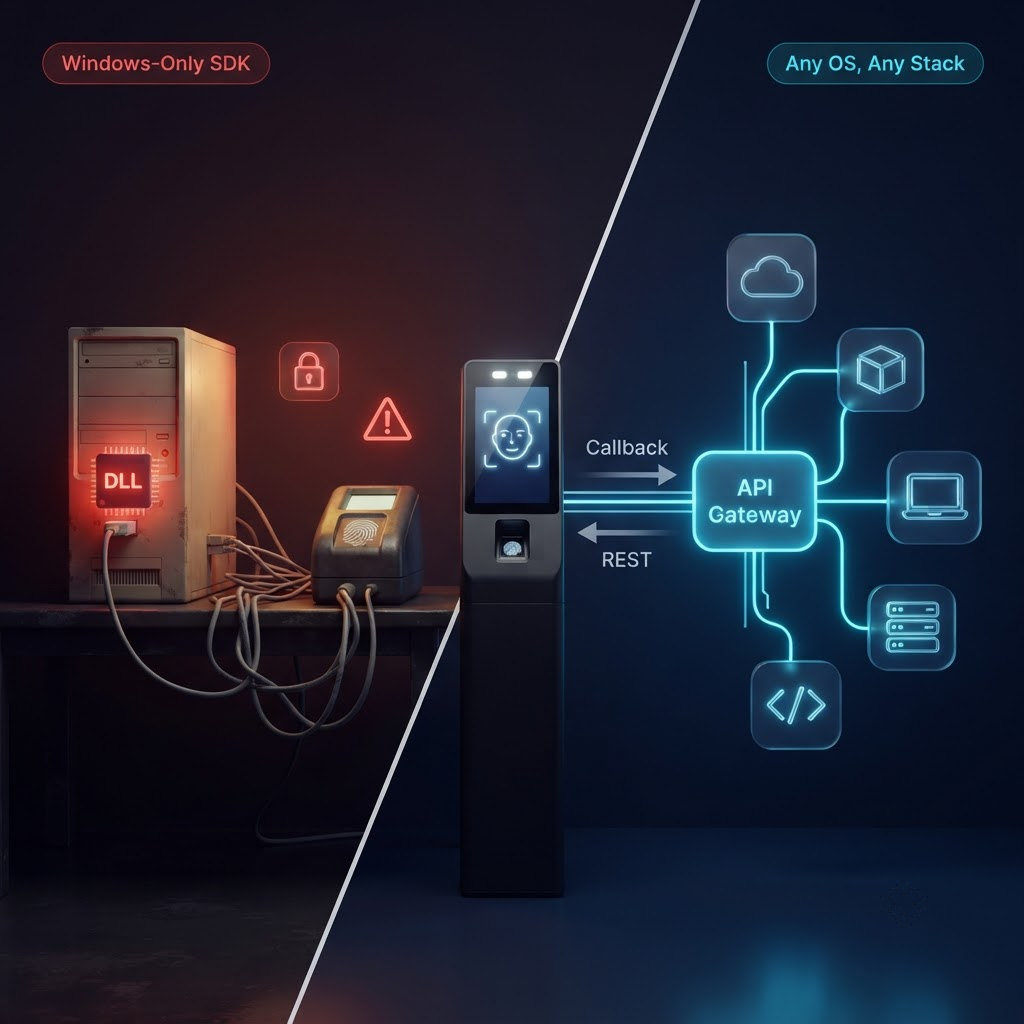
The SDK is, in a limited sense, a protocol adapter. It adapts the device’s binary protocol into a callable programming interface. The architectural problem is that this adaptation only works in one direction, only on machines where the SDK is installed, only for the specific device brand it was written for, and only within the execution model of the language the SDK was compiled for.
Why SDK-Based Architecture Cannot Scale
The SDK model was a reasonable solution for the world it was designed for: a single desktop application, running on a local machine, communicating with a single brand of device over a local area network. In that context, the SDK works well. The limitations only become visible when the architectural requirements change.
The installation dependency problem
An SDK must be installed on the machine that runs the integration code. This means your integration cannot run in a containerised cloud environment, a serverless function, or a hosted automation platform. It must run on a specific machine with the SDK files present. If that machine is decommissioned, rebuilt, or migrated to a different operating system, the integration breaks.
In 2026, most enterprise software infrastructure has moved toward cloud-native deployment. Container orchestration, serverless functions, and managed cloud services are the standard. An SDK dependency is architecturally incompatible with this model because containers are stateless and ephemeral. They do not maintain installed software libraries between deployments.
The multi-brand multiplicity problem
Each biometric device manufacturer distributes their own SDK. These SDKs are not interoperable. The ZKTeco SDK cannot communicate with a Hikvision device. The Suprema SDK cannot communicate with an Anviz device. If your organization has deployed hardware from multiple manufacturers across different sites, you need a separate SDK integration for each brand.
This multiplies every maintenance burden. A firmware update from one manufacturer may change the binary packet structure, breaking the SDK integration for that brand while leaving others unaffected. Each integration must be maintained, monitored, and updated independently.
The language and runtime boundary problem
Most biometric device SDKs are distributed as compiled C or C++ libraries with Windows-specific binaries. If your integration layer is written in Python, Node.js, or Go, you face an additional translation problem: calling C library functions from a managed runtime environment requires platform-specific foreign function interface code, which is fragile and difficult to maintain across operating system versions.
An engineering team that has built SDK integrations for three biometric device brands is not maintaining one integration. They are maintaining three entirely separate codebases, each with its own connection logic, binary parsing code, error handling, and firmware compatibility surface. When one firmware update breaks one integration, diagnosing the issue requires deep familiarity with that specific manufacturer’s binary protocol, knowledge that is rarely documented and often lives only in the head of the engineer who originally wrote the integration.
The Protocol Adapter Pattern: A Formal Definition
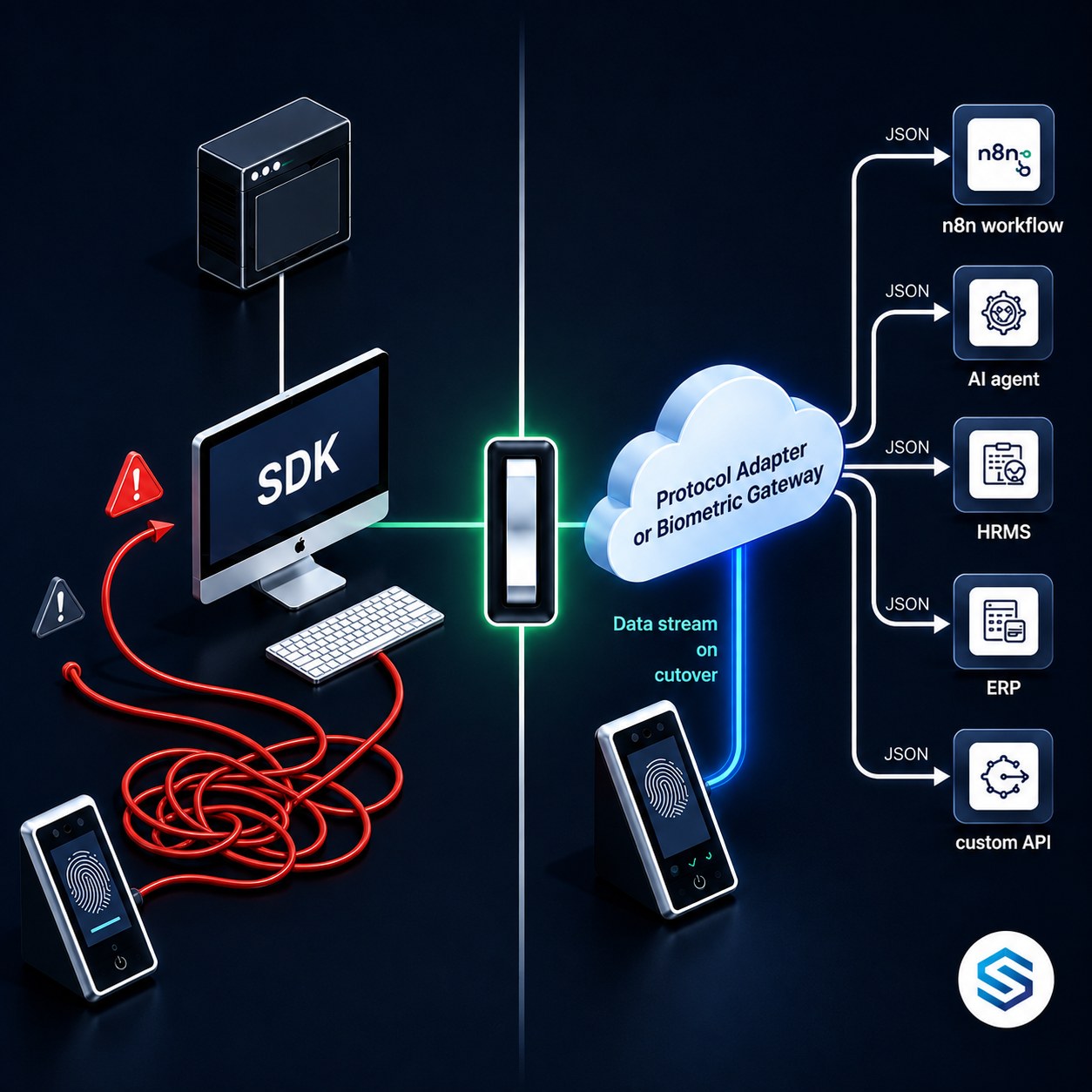
The protocol adapter pattern is a well-established software architecture pattern that solves the problem of incompatible communication protocols by introducing a dedicated translation layer between the two systems. The adapter speaks the native language of the source system on one side and the expected language of the target system on the other side. Neither system needs to change.
In software engineering, this pattern is sometimes called the Adapter pattern or the Translator pattern. In network engineering, it is the principle behind protocol gateways. In enterprise integration, it is the basis of message brokers and integration platforms. The specific implementation details vary, but the core architectural concept is consistent: isolate the translation concern so that neither the source nor the target system needs to know or care about the other’s communication model.
A universal electrical adapter lets you plug a device with a European two-pin plug into a British three-pin socket. The device does not change. The socket does not change. The adapter handles the translation between two incompatible physical standards. A protocol adapter does the same thing for software communication standards. The biometric device continues to speak its binary protocol. The cloud API continues to speak JSON over HTTPS. The adapter translates between them.
The Four Layers of a Biometric Protocol Adapter
A well-designed protocol adapter for biometric devices is not a single function. It is a layered architecture where each layer has a specific, bounded responsibility. Understanding these layers helps explain why building a robust adapter is more complex than it initially appears, and why a purpose-built solution is significantly more reliable than a custom integration.
Inside the Adapter Core: What the Translation Actually Involves
The adapter core is where the real complexity lives. Each of its five components addresses a specific technical challenge that makes direct integration impractical.
Connection Manager
Biometric devices expect a persistent TCP connection. The connection manager maintains one long-running socket connection per device, handles the manufacturer-specific handshake that authenticates the software to the device, monitors the connection health through keepalive probes, detects disconnections, and executes reconnection logic with appropriate backoff timing. For a system managing 50 devices across multiple sites, the connection manager is running 50 concurrent socket sessions simultaneously, each with its own state machine.
Binary Decoder
Each packet arriving from a device is a sequence of bytes with a specific structure defined by the manufacturer. The binary decoder parses these packets by reading fixed-width fields at known byte offsets, applying bit masks to extract flag values, converting binary-encoded timestamps into standard datetime formats, and decoding character sets that may not be standard UTF-8. The decoder must handle multiple packet types, which are identified by a type byte at a known offset, and route each packet type to the appropriate parsing routine.
Event Normalizer
A fingerprint scan event on a ZKTeco device arrives with different field names, different timestamp formats, and different status codes than the equivalent event on a Hikvision device. The event normalizer maps every manufacturer-specific event representation into a single, consistent internal event schema. This normalization step is what allows Layer 3 and Layer 4 to be completely brand-agnostic. The consumer receives the same JSON structure regardless of which device generated the event.
{
  "RealTime": {
    "OperationID": "9nu1wak5616p",
    "LabelName": "Burj Khalifa",
    "SerialNumber": "ZHM11xxxxxxxx",
    "PunchLog": {
      "Type": "CheckIn",
      "Temperature": "36.8",
      "FaceMask": false,
      "InputType": "Fingerprint",
      "UserId": "2",
      "LogTime": "2020-09-17 07:48:22 GMT +0530"
    },
    "AuthToken": "COJJ7eiiPBGUfmIQPvh2PJWWDLX7OuKs",
    "Time": "2020-09-17 04:19:03 GMT +0000"
  }
}
Command Encoder
The punchlog payload above is what the Binary Decoder and Event Normalizer produce when a real-time biometric event arrives at the Biometric Gateway from a physical device. This structured JSON is then published to your configured callback endpoint, whether that is an n8n Webhook node, an AI agent, an HRMS endpoint, or any other consumer.
The Command Encoder works in the opposite direction. When a consumer sends a JSON instruction to the API surface, for example a request to enroll a new user or revoke access permissions, the Command Encoder translates that structured JSON into the binary command packet that the target device expects. It places field values at the correct byte offsets for that manufacturer’s protocol, prepends the packet type identifier, calculates and appends any required checksums, and writes the resulting binary frame to the device’s persistent socket connection. The same logical instruction, expressed once as clean JSON by the consumer, becomes a completely different binary structure on the wire depending on which device brand is receiving it. The Command Encoder handles every variation internally so that the consumer never has to.
Resilience Handler
Physical devices in operational environments go offline. Power cycles, network interruptions, and device restarts are routine events. The resilience handler buffers events that arrive during a disconnection so they are not lost, queues outgoing commands that cannot be delivered until the connection is restored, implements exponential backoff for reconnection attempts to avoid flooding a restarting device, and surfaces structured error responses to consumers when an operation cannot be completed due to device unavailability.
The Architectural Properties That Define a Good Protocol Adapter
Not all protocol adapters are created equal. A well-designed adapter has specific architectural properties that distinguish it from a fragile custom integration.
Why Cloud Deployment Changes the Adapter Architecture Requirements
The shift from on-premises to cloud-native enterprise infrastructure fundamentally changes what a protocol adapter must be. An adapter designed for on-premises deployment can rely on local SDK installations, fixed network configurations, and persistent server processes. An adapter designed for cloud deployment cannot rely on any of these.
Stateless versus stateful design
Cloud-native deployment environments favour stateless processes. A stateless process can be started, stopped, and restarted without losing important data, because all persistent state is stored externally. Biometric device connections are inherently stateful: they require a persistent socket that holds connection context across interactions. A cloud-native protocol adapter must externalize this state, maintaining connection metadata in a persistent store so that connection context survives process restarts.
The separation of connection management from API serving
A well-architected cloud protocol adapter separates the connection management layer from the API serving layer. The connection management layer runs as a dedicated service that maintains persistent device connections and publishes normalized events to an internal message queue. The API serving layer reads from that queue and serves REST requests independently. This separation allows each layer to scale independently and means that an API serving process restart does not disrupt active device connections.
If your API server and your device connection manager are the same process, restarting the API server to deploy an update breaks all active device connections. If they are separate processes, you can deploy updates to the API server without touching the connection manager, and active device connections remain uninterrupted. In an operational environment where devices are processing attendance events continuously, connection continuity is not a convenience. It is a data integrity requirement.
The Migration Path: Moving from SDK to Protocol Adapter
Organizations that currently rely on SDK-based integrations do not need to rebuild everything at once. Protocol adapter architecture is designed to be introduced incrementally, with the adapter gradually taking over responsibilities from the existing SDK integration.
Compliance Considerations in Protocol Adapter Design
When biometric data flows through a protocol adapter, the adapter becomes a data processor in the legal sense under most data protection frameworks. This creates specific design obligations that must be addressed in the adapter architecture.
- GDPR, EU: The adapter must implement data minimization at the normalization layer. Event data passed to consumers must contain only the fields required for the specific purpose. The adapter must not retain biometric template data longer than required for the operation in progress.
- CCPA and CPRA, California: The adapter must not make biometric data available to consumers in ways that enable profiling or re-identification beyond the consented purpose. API access controls must enforce purpose limitation at the consumer level.
- LGPD, Brazil: Processing records must document the adapter as a processing component with its specific role, the data it touches, and the retention rules applied at each layer.
- PDPA, Singapore, Malaysia, Thailand: Access controls on the API surface must enforce consent-based restrictions. Consumers must only receive data for purposes that the data subject has consented to.
- ISO 27001-aligned controls: The adapter should apply encryption in transit at both the device connection layer (where the device protocol permits) and the API surface layer. Access to API endpoints must be authenticated. All operations must generate immutable audit log entries.
Frequently Asked Questions
Conclusion: Cams Biometrics Gateway Is This Architecture, Built and Running
Protocol adapter architecture is the correct engineering answer to the biometric integration problem. It is not a workaround. It is a well-established pattern applied to a specific domain where it is urgently needed.
Cams Biometrics Gateway is a production implementation of this architecture. It maintains persistent connections to devices from 15 or more manufacturers, runs a binary decoder and event normalizer for each supported protocol, and exposes the complete operation set through a unified REST API and MCP server. The result is 38 biometric operations accessible through standard JSON over HTTPS, with real-time webhook callbacks for every device event, and zero SDK installation required anywhere in your infrastructure.
If your organization has biometric devices and systems that need to consume biometric data, the protocol adapter layer is the architectural piece you are missing. Explore the Cams Biometrics Gateway API at CamsBiometrics.com or talk to our team about connecting your existing hardware to the modern cloud API layer it deserves.