Manufacturing plants are not offices. The shop floor has no reliable internet. The network is air-gapped for security. Workers rotate across three shifts. Hundreds of devices are scattered across a facility the size of several football fields. Punch cards and manual registers have been the default for decades not because they are good but because no biometric solution was designed with manufacturing constraints in mind. This article covers the five specific problems manufacturing plants face and the architecture that solves each one.
Shop Floor Biometric Attendance Without Internet: How It Works
Walk through the entrance of most manufacturing facilities and you will find two very different network environments. The administrative block has reliable broadband, Wi-Fi, and cloud-connected systems. The production floor, fifty metres away, has none of that. Metal structures, industrial machinery, high-power electrical equipment, and the physical size of production facilities all degrade wireless signal. Many plants have deliberately kept production floor networks separate from administrative networks for operational and security reasons.
The result is that every biometric device installed on the shop floor operates in an environment that is intermittently or permanently disconnected from the internet. For a standard biometric system that requires a continuous cloud connection, this is a deployment-ending problem. For a system designed with offline operation as a first-class requirement, it is a configuration detail.
Workers scan their fingerprints at the start and end of every shift. If the biometric terminal loses connectivity to the central server midway through a shift, those punches are lost. Attendance records have gaps. Payroll calculations are wrong. Workers dispute their hours. HR spends hours reconstructing attendance from paper backup logs that should not need to exist.
What offline operation actually requires
A biometric terminal that works without internet is not a passive device waiting for the network to return. It is an active system with three distinct operating states that must be managed correctly for the attendance record to remain complete and accurate.
Cams Biometric Gateway includes an Offline Cache and Queue built into its Protocol Engine. When a device is unreachable, the Gateway queues all pending operations with their original timestamps. When connectivity is restored, queued records are delivered to your configured Callback URL in order, with no manual intervention required. ZKTeco, Suprema, Hikvision, and other devices supported by the Gateway store attendance records in their own local memory, meaning even if the Gateway itself is temporarily unreachable, no punch is ever lost at the device level.
From Punch Cards to Real-Time Production Tracking
The punch card is one of the oldest workforce management tools in industrial history and it is still in active use in manufacturing facilities across the world. Not because plant managers believe it is optimal, but because replacing it has always seemed more disruptive than maintaining it. The punch card does one thing reliably: it records a time. Everything else, calculating hours, verifying identity, detecting buddy punching, generating shift reports, feeding payroll systems, is done manually downstream.
The gap between what a punch card records and what a modern manufacturing operation needs to know is enormous. A punch card tells you that someone arrived. It does not tell you which production line they reported to, whether the right number of workers are present for the current shift, whether a critical workstation is understaffed in real time, or whether someone who punched in an hour ago has since left the floor without logging out.
A production supervisor discovers at 11am that one of three workers on a critical assembly line called in sick but their punch card was used by a colleague to cover the absence. The supervisor has no real-time visibility of who is actually present at which station. The attendance register from this morning shows three workers present. The reality is different. By the time the discrepancy is discovered, two hours of production have run with incorrect staffing.
What real-time production tracking actually means
Real-time production tracking through biometrics is not simply a faster version of punch cards. It is a fundamentally different data model. A punch card produces a record after the fact. A biometric callback produces a verified event at the moment it occurs, with identity confirmed at the point of entry, and that event is immediately available to every connected system.
When a worker scans their fingerprint at a production line entrance, the Cams Gateway Callback API delivers a JSON event to your ERP, HRMS, or production management system within milliseconds. That system can immediately check whether the correct number of workers are present for that line, trigger an alert if a critical station is understaffed, update the live headcount dashboard, and feed the time record directly into payroll without any manual data entry at any stage.
{
  "RealTime": {
    "OperationID": "9nu1wak5616p",
    "LabelName": "Assembly Line 3 Entrance",
    "SerialNumber": "ZHM11xxxxxxxx",
    "PunchLog": {
      "Type": "CheckIn",
      "InputType": "Fingerprint",
      "UserId": "EMP-4471",
      "LogTime": "2026-08-01 06:00:12 GMT +0530"
    },
    "AuthToken": "COJJ7eiIPBGUfmIQPvh2PJWWDLX7OuKs",
    "Time": "2026-08-01 00:30:12 GMT +0000"
  }
}
The LabelName field identifies exactly which entry point the worker scanned at, not just that they entered the facility. This allows production management systems to know which line is manned, not just which workers are somewhere in the building.
Every biometric terminal connected to Cams Gateway is labelled with its physical location. Every punch event includes that label in the Callback payload. Your ERP or production system receives a verified, identity-confirmed, location-specific event at the moment of scan. Buddy punching is eliminated because the fingerprint or face cannot be delegated. Manual attendance registers are eliminated because every record is generated automatically. Real-time production floor headcount becomes a live data feed rather than a morning paper count.
Air-Gapped Manufacturing Networks: Our Specialty
An air-gapped network is a network that has no connection to the public internet, deliberately. In manufacturing, air-gapped networks are most common in defence contractors, pharmaceutical production, semiconductor fabrication, and any facility where intellectual property, process formulas, or regulatory compliance requirements make internet connectivity on the production network unacceptable.
For most biometric vendors, an air-gapped network is a deployment they cannot support. Their cloud-based management platforms require the device to have internet access to register, authenticate, and send data. An air-gapped device is, from their architecture’s perspective, a device that does not exist.
A pharmaceutical manufacturing plant runs its production network completely isolated from the internet, as required by its regulatory framework. Workers need biometric access control at every clean room entrance and production area. Every standard biometric vendor the plant evaluates requires their cloud portal to be reachable from the device network. The plant cannot permit this. The procurement process stalls. Manual access logs remain in place for years after a biometric solution was supposed to replace them.
Why air-gapped deployment is an architecture decision, not a limitation
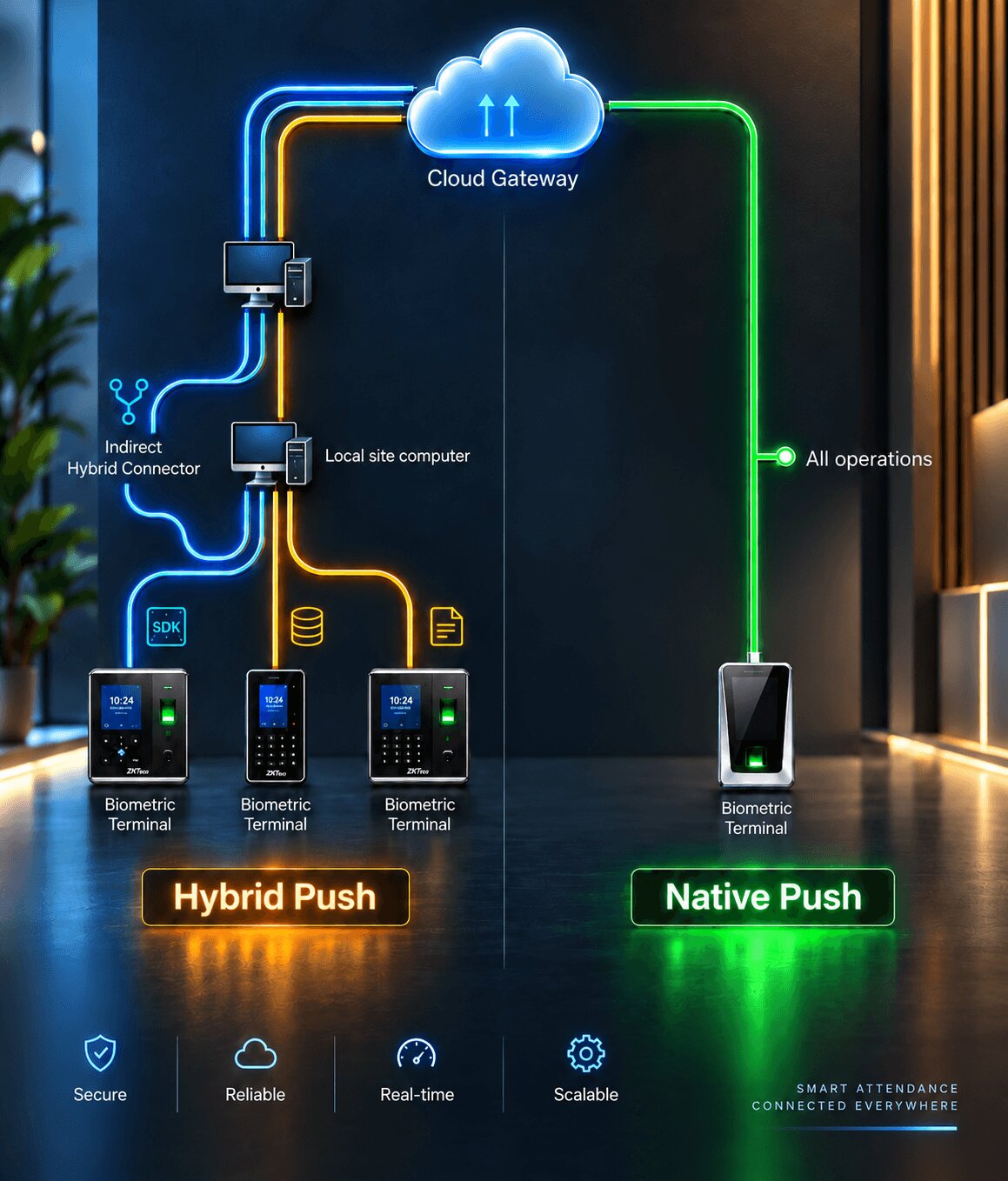
An air-gapped network does not prevent biometric deployment. It changes the topology of how the Gateway connects to the devices. Instead of the Gateway reaching out to the devices over the public internet, a small software component called the Hybrid Connector is installed on a machine inside the air-gapped network. The Hybrid Connector creates an outbound tunnel from inside the secure network to the Gateway, without requiring any inbound connections or firewall rule changes that would expose the network.
What the Hybrid Connector does inside the secure network
The Hybrid Connector runs on any Windows or Linux machine inside the plant network. It connects to the biometric devices using their native protocols, communicates with the Cams Gateway through an outbound HTTPS tunnel, and acts as the bridge between the secure internal environment and the Gateway’s standardised API layer. From the Gateway’s perspective, the device is connected and fully operational. From the plant network’s perspective, all traffic is outbound HTTPS, the same protocol used by any web browser.
Cams Gateway supports Indirect Hybrid Push topology specifically for environments where no public IP or inbound connection is acceptable. The Hybrid Connector is installed on a single machine inside the air-gapped network. It requires only outbound HTTPS access on port 443, which most corporate firewalls already permit. All 15 plus supported device brands work through this topology. AES-256 encryption is available on all communication. No biometric data ever traverses the public internet in unencrypted form. The plant’s security team retains full control of what enters and exits the secure network.
Shift Management Made Easy with Biometric Automation
Manufacturing operates on shift patterns that no office attendance system was designed to handle. A single facility may run workers across three shifts per day, seven days a week, with different workers on each shift, rotating schedules that change weekly, and overnight shifts that cross midnight and span two calendar days. The attendance system must handle all of this correctly or payroll calculations will be wrong every single week.
The manual alternatives, paper registers, Excel spreadsheets, and standalone punch card machines, each accumulate small errors daily. A forgotten register entry, a timestamp on the wrong side of midnight, a supervisor who approved overtime that was never properly recorded. By the end of a payroll period, the HR team is spending more time reconciling attendance discrepancies than processing payroll itself.
A garment factory runs three shifts: day, evening, and night. Night shift workers punch in at 10pm and punch out at 6am the following day. The attendance system records the 10pm punch against Tuesday and the 6am punch against Wednesday, but the payroll module calculates the shift as two separate half-days rather than one complete night shift. Every night shift worker’s pay for the month requires manual correction. With 300 night shift workers, this is a weekly reconciliation exercise that takes three HR staff members two full days.
How biometric data feeds correct shift records
The biometric device records the exact timestamp of every scan. It does not interpret the shift. The interpretation happens in your HRMS or payroll module when it receives the Callback payload. The key is that the payload contains both the exact LogTime of the scan and the UserId of the worker, giving your system everything it needs to assign the punch to the correct shift window using whatever shift definitions your business uses.
When the same biometric gateway serves all three shifts through the same devices, there is no gap between shift transitions. The night shift worker’s 10pm check-in arrives at the HRMS the moment it happens. The 6am check-out arrives the following morning. The HRMS matches both punches to the night shift record based on the worker’s assigned schedule. No manual correction is needed because no human interpreted the timestamp. The system did.
Every Callback payload from Cams Gateway includes the LogTime in the exact format your system needs, with time zone information preserved. The UserId in the payload maps directly to the employee ID in your HRMS. Your HRMS applies its own shift assignment rules based on the combination of UserId, LogTime, and device LabelName. Cams Gateway does not interpret shifts. It delivers accurate, verified, timestamped records and lets your payroll and HRMS logic do what it is configured to do. The result is that shift assignment, overtime calculation, and cross-midnight handling are all handled by the system your payroll team already understands, fed by data that is guaranteed to be accurate because it was captured biometrically and not entered by hand.
When a night shift worker scans at 22:00 on Tuesday and again at 06:00 on Wednesday, two separate Callback events arrive at your HRMS with their respective timestamps. Your HRMS knows this worker is assigned to the night shift and groups both events into one shift record spanning the midnight boundary. The biometric system is not responsible for this logic. It is responsible for delivering the right UserId and the right LogTime for each scan, which it does without exception.
Case Study: Automotive Plant Integrated 200 Devices Across 3 Shifts
The problems this plant faced before deployment
- Two device brands, two incompatible SDKs: The plant had ZKTeco devices in the manufacturing halls and Suprema devices at clean zone entrances. Each brand required its own SDK, its own Windows machine, and its own integration codebase. Maintaining two separate integrations was consuming significant IT resource.
- Partially air-gapped zones: The paint shop and body assembly areas ran on a network segment with no direct internet access due to the sensitivity of the manufacturing process data on those lines. Standard cloud-based biometric systems could not reach the devices in these zones.
- Night shift payroll errors every month: The existing punch card system could not handle the midnight boundary correctly. Every payroll run for night shift workers required manual correction by the HR team, averaging 14 hours of reconciliation work per payroll cycle.
- No real-time headcount visibility: Production supervisors had no way to know how many workers were present on a specific line at any given moment. Understaffing on a line was discovered by walking the floor, not by a system alert.
- Zero-touch enrolment requirement: With 4,500 workers to enrol across 200 devices, a manual enrolment process was not viable. The deployment window before the payroll cutover was four weeks.
How the deployment was structured
All 200 devices were registered under a single Cams Biometric Gateway account and organised into 12 device groups corresponding to the 12 production zones. ZKTeco and Suprema devices were connected through their respective communication methods within the same Gateway account, both appearing through the same unified API surface to the plant’s SAP system.
The three air-gapped production zones received Hybrid Connectors on existing machines already inside those network segments. No new hardware was required and no firewall changes were made except to permit outbound HTTPS on port 443, which was already permitted for software updates on those machines.
The 4,500 worker enrolment was completed using the Resend All Users API. Workers were enrolled at the main administrative block devices first, then the Gateway was instructed to push all user records to every device in the relevant production zone groups. The bulk provisioning completed across all 200 devices in under two hours, with no manual device interaction required at any terminal.
The outcomes after deployment
- Night shift payroll errors eliminated: Every punch record arrives at SAP with the exact LogTime and UserId. SAP’s shift assignment rules handle the midnight boundary correctly. The 14 hours of monthly reconciliation work was reduced to zero.
- Real-time production floor headcount: Each of the 12 production zone groups reports live attendance to a headcount dashboard. Supervisors see current zone occupancy without leaving the control room. Understaffing alerts fire automatically when a zone falls below its minimum required headcount for the active shift.
- Single integration for two device brands: The SAP team maintains one Callback endpoint and one RESTful API integration regardless of whether the punch came from a ZKTeco device or a Suprema device. The Gateway normalises all events into the same payload format.
- Air-gapped zones fully operational: All three air-gapped production zones are integrated without any compromise to the network security posture. No inbound connections were permitted and no firewall policy was weakened.
- 4,500 workers enrolled in under two hours: The Resend All Users operation pushed all worker records from the administrative enrolment devices to all 200 production zone terminals simultaneously, completing the bulk provisioning inside the deployment window.
No single capability solved this deployment. What made it possible was a gateway that handled multi-brand devices through one API, supported air-gapped topology without requiring network changes, delivered timestamped punch records that SAP could process without manual correction, and supported bulk provisioning at the scale the enrolment window required. Each of the five problems described in this article appeared in this one plant, and all five were solved within the same deployment.
Conclusion: Manufacturing Needs Biometric Infrastructure Built for Manufacturing
The five problems covered in this article are not edge cases. They are the standard operating environment of industrial manufacturing. Intermittent connectivity, legacy attendance systems, air-gapped security networks, complex shift patterns, and large multi-device deployments are the norm, not the exception.
Most biometric solutions were designed for offices. They assume reliable internet, single-shift operations, a small number of devices, and a network that the cloud can reach directly. When those assumptions do not hold, the solution does not work.
Cams Biometrics Gateway was built for environments where those assumptions do not hold. Offline cache and queue handles connectivity gaps. Hybrid Connector topology handles air-gapped networks without firewall changes. The Callback API delivers timestamped punch records that any HRMS or ERP can use to calculate shifts correctly. Bulk provisioning through the Resend All Users API handles large-scale enrolments without manual device interaction. And all 15 plus supported device brands, including ZKTeco, Suprema, Hikvision, Anviz, Morpho/IDEMIA, Virdi, Mantra, Nitgen, Realtime, Biomax, Secugen, eSSL, and Matrix, work through one unified API surface regardless of which brand is installed in your facility.
If your plant is still running punch cards, paper registers, or a biometric system that your production network cannot reach, the architecture that solves your specific environment is already built. Explore the full capability at CamsBiometrics.com about your facility’s specific requirements.