Every biometric device that connects to the Cams Biometric Gateway does so through one of two push modes. The mode your device uses determines which APIs are available, how events are delivered, and how your infrastructure needs to be configured. This guide walks through every variable in the decision, from device type to communication method to deployment topology, so you can choose the right path before you start building.
The First Question: What Kind of Device Are You Connecting?
Before choosing a communication method or deployment topology, there is a more fundamental question to answer: is your device a Cams Biometrics device, or a device verified at the Cams developer portal?
The answer to this question determines your push mode entirely. If the answer is yes, you use Native Push and no further decision is needed. If the answer is no, you are in Hybrid Push territory, and a series of additional decisions follows.
Mode 1
Native Push
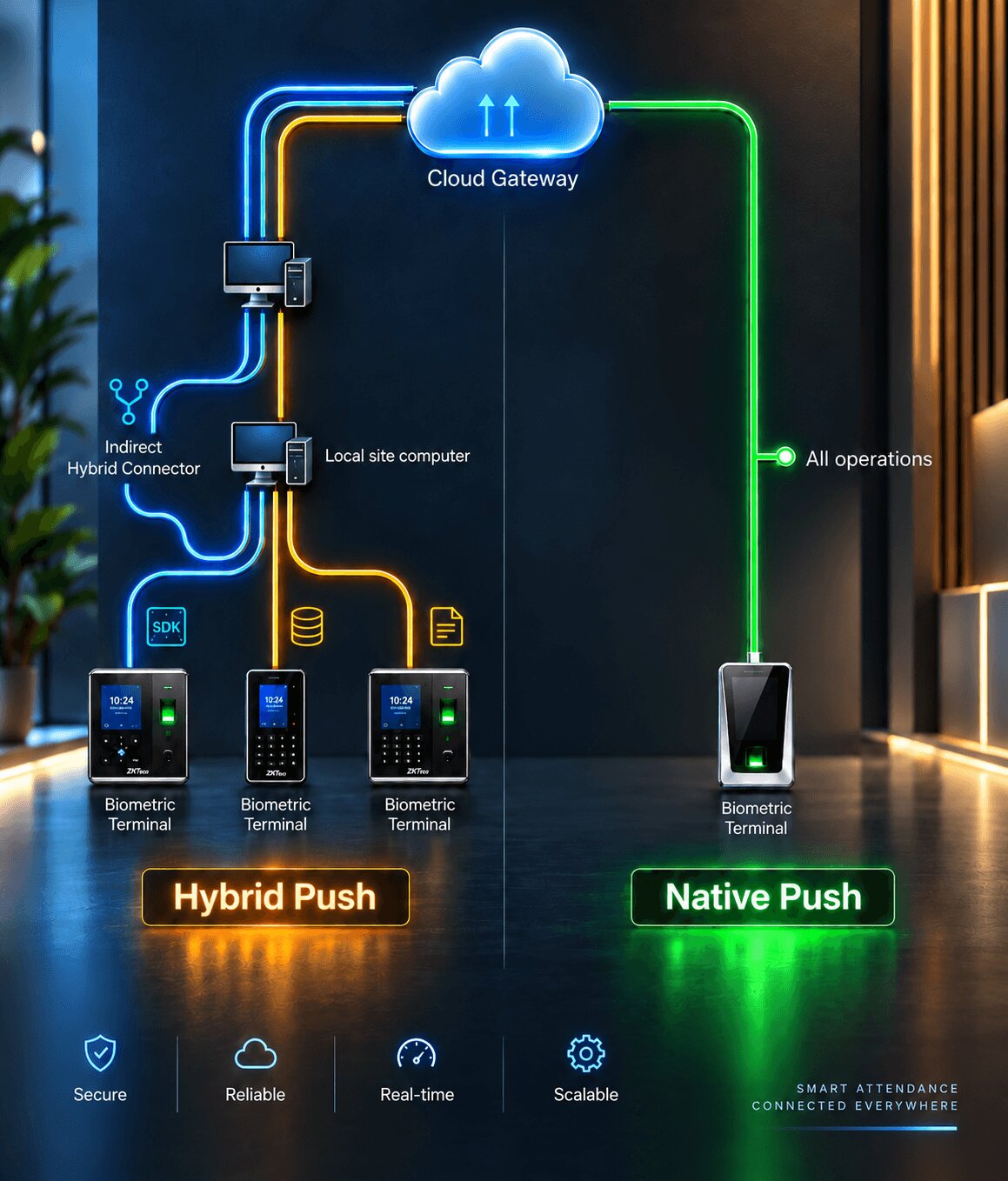
For all Cams Biometrics machines and any device listed as verified at developer.camsbiometrics.com. The device communicates directly with the Biometric Gateway over the internet with no additional setup required.
All 38 operations
Full Callback API
Full RESTful API
Mode 2
Hybrid Push
For all other non-verified devices. You select a communication method and deployment topology that fits your environment. API availability depends on the combination you choose.
3 communication methods
2 topology options
Variable API access
Native Push: the complete picture
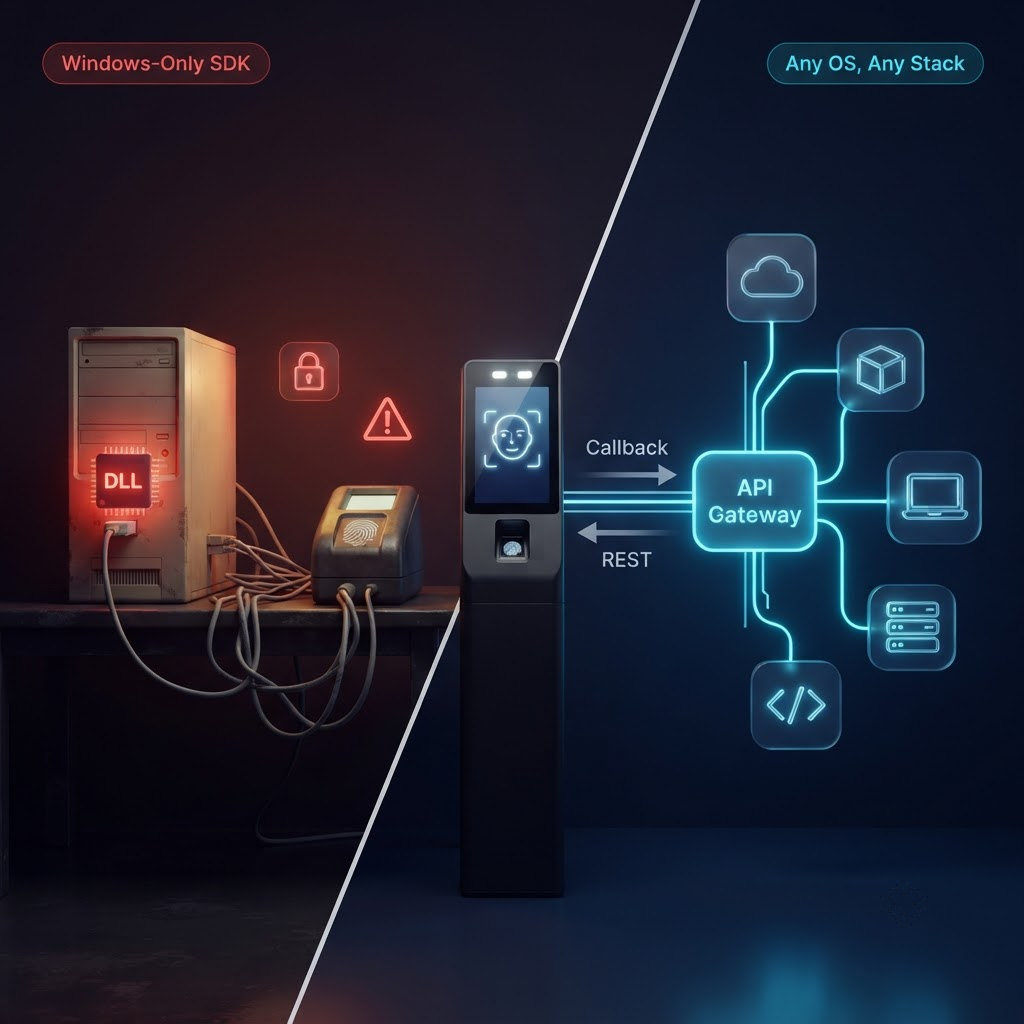
Native Push devices get full access to all 38 Gateway operations with no configuration beyond connecting the device to the internet. Callback API delivers events with zero latency. RESTful API commands execute in approximately 15 seconds. No SDK, no local software, no topology decision required.
Understanding Hybrid Push: Three Communication Methods
If your device is not a Cams or verified device, the next decision is how the Gateway will actually communicate with your hardware. There are three communication methods available, and each one has different requirements and different implications for which API features you can use.
The communication method is not about your network configuration. It is about the technical mechanism the Gateway uses to read data from, and send commands to, your specific device. This choice is constrained by what your hardware supports.
a
Device SDK
Best option for full API access
The Gateway communicates with the hardware using the device manufacturer’s SDK. The SDK handles the low-level device protocol, and the Gateway exposes all features the SDK supports through its API. This is the only communication method in Hybrid Push that enables RESTful API operations.
Full Callback API + Full RESTful API (within SDK capabilities)
b
DB Pull
Attendance data only
The Gateway reads from a local database that the device’s own management software writes attendance records to. The Gateway monitors this database and pushes new records to your callback URL in real time. No direct device communication occurs, which means no commands can be sent to the device. Operations like adding users, deleting records, or loading logs are not available.
Callback API: attendance and punch logs only. RESTful API: not supported.
c
File Processing
Attendance data only
A designated attendance file on the local computer is placed under continuous surveillance. Every time the device software updates this file with new attendance records, the Gateway detects the change, extracts the new records, and pushes them to your callback URL in real time. Like DB Pull, this method is read-only from the device perspective and carries the same API limitations.
Callback API: attendance and punch logs only. RESTful API: not supported.
How to choose a communication method
If your device has a manufacturer SDK that is supported by the Cams Gateway, choose Device SDK (a). It is the only method that unlocks RESTful API operations for Hybrid Push devices. If the SDK is not supported or not available, DB Pull (b) or File Processing (c) will still deliver attendance data to your callback endpoint in real time, which is sufficient for many use cases.
Understanding Hybrid Push: Two Deployment Topologies
Once you have chosen a communication method, the second decision is where the Gateway connects to your device, database, or file. This is the topology decision, and it depends on your network environment at the device’s physical location.
Topology X
Direct
The site computer where the device is connected, or where the device management software runs, has a public IP address with port forwarding configured to the local network. The Biometric Gateway connects directly to the device, database, or files over the internet.
Requires: public IP + port forwarding at the site
Topology Y
Indirect
A Hybrid Connector application is installed on the local site computer. It acts as an outbound bridge between the local machine and the Biometric Gateway, establishing the connection from the inside rather than requiring an inbound connection. No public IP is needed on the customer side.
Requires: Hybrid Connector installed on local computer. No public IP needed.
Topology recommendation
If you cannot configure a public IP or port forwarding at the site, choose Indirect topology (Y) with the Hybrid Connector. It is the simplest deployment path and avoids network configuration on the customer side entirely. If a public IP is available and configured, Direct topology (X) also works and requires no additional software installation at the site.
The Decision Tree: Which Mode Should You Choose?
Walk through this decision tree from top to bottom. Stop at the first answer that applies to your situation.
Decision tree, start from the top
1. Is your device a Cams Biometrics device, or listed as verified at developer.camsbiometrics.com?
Yes Use Native Push. Full API access. No further decisions needed.
No Continue to question 2.
2. Does the Cams Gateway support the SDK for your device manufacturer?
Yes Use Hybrid Push, Device SDK (a). Full Callback and RESTful API access within SDK limits. Continue to question 3 for topology.
No Continue to question 2b.
2b. Does your device management software write attendance records to a local database?
Yes Use Hybrid Push, DB Pull (b). Attendance Callback only. Continue to question 3 for topology.
3. Does the site computer have a public IP address with port forwarding available?
Yes Use Direct topology (X). No additional software needed at the site.
No Use Indirect topology (Y). Install the Hybrid Connector on the local site computer.
Hybrid Push Feature Availability Matrix
The table below shows every combination of communication method and deployment topology, and what API features are available in each case. Use this alongside the decision tree to confirm what your chosen configuration supports.
| Mode |
Communication |
Topology |
Callback API |
RESTful API |
| Direct Device |
(a) Device SDK |
(X) Public IP |
Full |
Full (SDK limits apply) |
| Indirect Device |
(a) Device SDK |
(Y) Hybrid Connector |
Full |
Full (SDK limits apply) |
| Direct DB |
(b) DB Pull |
(X) Public IP |
Attendance only |
Not supported |
| Indirect DB |
(b) DB Pull |
(Y) Hybrid Connector |
Attendance only |
Not supported |
| Direct File |
(c) File Processing |
(X) Public IP |
Attendance only |
Not supported |
| Indirect File |
(c) File Processing |
(Y) Hybrid Connector |
Attendance only |
Not supported |
Important hardware caveat
Hardware limitations can further restrict API features even within Device SDK mode. Specific APIs may not function depending on the device model’s firmware version or the capabilities exposed by the manufacturer’s SDK. The matrix above describes what the Gateway architecture supports, not what every individual device model is guaranteed to support. Always test with your specific hardware and verify edge cases with the Cams support team before production deployment.
What the Topology Decision Does and Does Not Affect
A common point of confusion is the relationship between topology and API availability. The topology choice, whether Direct or Indirect, does not affect which API features are available. The API feature set is determined entirely by the communication method.
What topology does affect is how the network connection between the Gateway and your local environment is established. Direct topology requires a public IP and port forwarding at the site. Indirect topology requires the Hybrid Connector to be installed on the local machine. The API features available to you are identical for Direct Device SDK and Indirect Device SDK, and identical for Direct DB Pull and Indirect DB Pull.
“Choose your communication method based on what API features your integration needs. Choose your topology based on what your network environment supports. These are independent decisions.”
Frequently Asked Questions
Can I use DB Pull or File Processing alongside RESTful API commands?
No. DB Pull and File Processing are read-only integration methods. They allow the Gateway to observe attendance data generated by the device’s own software, but they do not establish a channel through which commands can be sent back to the device. RESTful API operations such as adding users, deleting records, or loading logs require Device SDK mode, which creates a bidirectional communication channel.
Does the Hybrid Connector need to be installed on the same machine as the device software?
Yes. The Hybrid Connector must be installed on the same local computer where the device is connected or where the device management software runs. This is because it needs local access to the device, the local database, or the attendance file, depending on your communication method. The Connector then creates an outbound tunnel to the Gateway, removing the need for a public IP at that location.
What is the latency difference between Native Push and Hybrid Push?
For Native Push, Callback API events are delivered with zero latency and RESTful API commands execute in approximately 30 seconds. For Hybrid Push using Device SDK, latency depends on the SDK’s own communication cycle and varies by device manufacturer. DB Pull and File Processing latency depends on how frequently the local software writes new records and how quickly the Gateway detects the change, typically within a few seconds of the device recording the event.
Conclusion: Match Your Mode to Your Constraints
The connection mode decision for the Cams Biometric Gateway is not a preference question. It is a constraints question. Native Push is the right answer if your device qualifies, because it provides the most capability with the least configuration. Hybrid Push is the answer for everything else, and within it, Device SDK mode gives you the closest equivalent to Native Push in terms of API access.
When full SDK access is not available, DB Pull and File Processing are pragmatic paths that still deliver real-time attendance data to your systems. The topology decision is then a separate, infrastructure-level choice that does not change what the API can do.
Start with the decision tree, confirm your choice against the feature matrix, test with your hardware, and verify any edge cases with the Cams support team before going to production.