




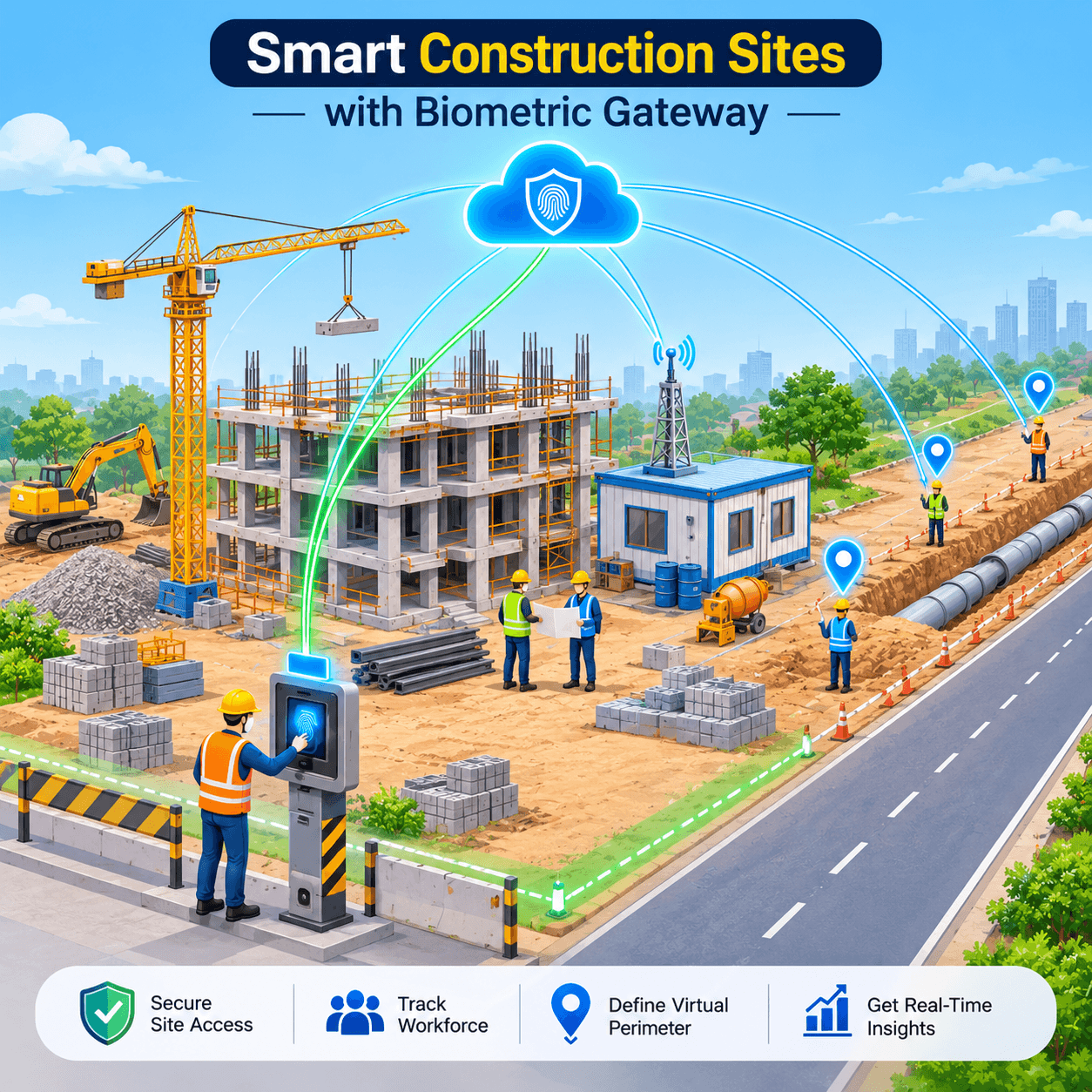
An office has a front door. A construction site has a gate this month, a different gate next month, and a crew working three hundred metres away on the far side of the plot. Workers come from five subcontractors, sites open and close on a project timetable, and the nearest network cable might be in a cabin on the other side of a mud track. Construction site biometric attendance has to follow the work rather than the building. This guide explains how to design it around sites that move.
01 · THE PROBLEM
Why construction sites break traditional attendance systems
Most attendance systems were designed for a fixed building with a permanent entrance, a stable workforce, and a network socket on the wall. A construction site has none of those. The useful question is not “which clock should we buy” but “what assumptions does a normal system make that a site breaks?”
| Assumption | In an office | On a construction site |
| The building is fixed | One entrance for years | Gates move as the build progresses, and sites close when the project ends |
| Staff are employees | One employer, one payroll | Several subcontractors, each billing for its own crew |
| Everyone works inside | Check in at the door, work at a desk | Crews spread across a large plot, or travel between sites in one day |
| The network is there | Fixed line and an IT team | A mobile router in a cabin, often with a changing IP address |
| Hands are clean | Fingerprints read easily | Dust, cement, gloves, and worn skin make fingerprints harder to read |
Every one of these breaks a different part of the system. The rest of this article takes them one at a time.
|
Watch: construction site attendance in under a minute A short video from the Cams Biometrics YouTube channel. |
02 · SITE IDENTITY
Every punch carries its site: reading the callback
If a site has no walls, the device becomes the boundary. A worker is “on site” because they verified at that site’s device, so the most important thing your software needs from every punch is not only who and when, but where.
With Cams Biometrics Gateway, each successful verification is sent to your server through the Callback API, the push direction from device to software. The callback already identifies the device it came from, and where location is captured, it carries the exact coordinates of the punch as well. Here it is exactly as documented, and fittingly, the sample device is labelled after a construction landmark:
{
  "RealTime": {
    "OperationID": "9nu1wak5616p",
    "LabelName": "Burj Khalifa",
    "SerialNumber": "ZHM11xxxxxxxx",
    "PunchLog": {
      "Type": "CheckOut",
      "Latitude": "32.862944215798194",
      "Longitude": "-87.60144797380944",
      "Temperature": "36.8",
      "FaceMask": false,
      "InputType": "Fingerprint",
      "UserId": "2",
      "LogTime": "2020-09-17 07:48:22 GMT +0530"
    },
    "AuthToken": "COJJ7eiIPBGUfmIQPvh2PJWWDLX7OuKs",
    "Time": "2020-09-17 04:19:03 GMT +0000"
  }
}
|
Anatomy of a site punch
| Field | Answers | How a construction business uses it |
| LabelName | Which site or gate | Name each device after its site and gate, for example “Tower B North Gate”, so reports group by site without extra mapping |
| SerialNumber | Which physical device | Stays the same when a device is moved to a new site, so you can track equipment as well as people |
| UserId | Who | Links the punch to the worker, and through your software to their subcontractor |
| Type | Arriving or leaving | Pairs check-ins with check-outs to calculate hours on site |
| Latitude Longitude |
Where exactly punches received from biometric device | The GPS coordinates of the punch. Your software can plot field crews on a map, check that a punch fell inside the site boundary you have drawn, and separate work on a road or pipeline route by section |
| InputType | How they verified | Shows whether a worker used fingerprint, face, card, or another input, which helps spot sites where an input is struggling |
| LogTime | When, really | The real scan time with the device’s time offset. Use it for attendance and hours |
Your server confirms receipt with HTTP 200 and { "status": "done" }. A worker who moves between two sites in one day simply produces punches with two different LabelName values, and your software can split their hours by site for job costing.
03 · SITE LIFECYCLE
The site lifecycle: construction site biometric attendance from mobilisation to demobilisation
An office attendance system is set up once. A construction site has a beginning, a middle, and an end, and the people on it change at every stage. Think of the attendance system the way you think of site welfare cabins: it arrives with the project, adapts as the project changes, and leaves cleanly when the project is handed over.
The changes at each stage are made with the RESTful API, the command direction where your software tells the devices what to do. RESTful commands typically complete in around 15 seconds, so they suit planned changes rather than gate-side fixes.
| 1. Mobilise | 2. Build | 3. Rotate trades | 4. Demobilise |
| Install devices at the site gates, label them, and place them in one device group. Enrol the core crew with Add User. | Daily punches flow in by callback. When a new gate opens, add a device to the group and use Resend All Users to copy the crew list to it. | Short-term trades, such as a two-week scaffolding crew, get an access window with #36 UpdateAccessTime. | Remove workers with #29 DeleteUser, which deletes the user and all their biometric templates, then move the devices to the next project. |
Enrolling a worker during mobilisation uses the Add User request:
{
  "Add": {
    "User": { "UserID": "1", "FirstName": "Manu", "LastName": "Mona", "UserType": "User" }
  },
  "OperationID": "1jxpjeoasu8wl",
  "AuthToken": "COJJ7eiPBGUfmIQPvh2PJWWDLX7OuKs",
  "Time": "2020-09-17 11:09:09 GMT +0530"
}
|
The device answers with { "Status": "done", "OperationID": "1jxpjeoasu8wl", "StatusCode": 0 }. RESTful requests use UserID and a capitalised Status, unlike callbacks.
When a second or third gate opens on the same site, the Resend All Users operation syncs users to all devices in the same device group in the Cams portal, so every gate recognises the same crew:
{
  "OperationID": "j95xfejt3vr1",
  "Resend": { "User": "All" },
  "AuthToken": "COJJ7eiiPBGUfmIQPvh2PJWWDLX7OuKs",
  "Time": "2020-09-17 12:01:33 GMT +0530"
}
|
|
Why demobilisation matters Construction companies often reuse devices across projects. If a device moves to a new site still holding the last project’s workers, people who no longer belong can verify at the new gate. Removing users at demobilisation, and the access windows set for short-term trades, keep each site’s device list matched to each site’s workforce. |
04 · FIXED OR GPS
Fixed terminals or GPS biometric attendance: choosing for each kind of work
Not every construction worker passes through a gate. Survey teams, utility crews, road gangs, and maintenance technicians may work along a route or across several small locations in a day. For them, a fixed terminal at a site entrance records only part of the story.
Cams lists GPS tracking among its supported input types, alongside fingerprint, face recognition, palm vein, RFID card, PIN, and QR code. The practical design question is which kind of work suits which method.
| Kind of work | Better fit | Why |
| Building site with a controlled gate | Fixed terminal at the gate | Every worker passes one point, and the device label identifies the site |
| Large plot with several entry points | Several fixed terminals in one device group | Workers use the nearest gate, and all gates share one crew list |
| Linear works such as roads, pipelines, and cabling | GPS attendance | The workplace moves along a route, so a fixed gate does not exist |
| Technicians visiting several small sites a day | GPS attendance | A terminal at every small site is impractical |
| Mixed: a main site plus field crews | Both, reported together | Gate punches and field punches arrive in the same software, so hours can be combined |
A useful way to picture the difference: a fixed terminal is a turnstile, and GPS attendance is a passport stamp. The turnstile proves you came through a known door. The stamp proves where you were when you checked in. Construction businesses with both kinds of work usually need both, feeding the same payroll and job costing.
GPS punches reach your software through the same callback, with the Latitude and Longitude fields shown in Section 02. How location is captured depends on the device or app used, so confirm the setup with the Cams team for your use case. Any site boundary check, such as flagging a punch made outside the work area, is a rule you set in your own software.
Dust, gloves, and worn fingerprints
Manual work can make fingerprints harder to read, and site conditions add dust and gloves. The InputType field in each callback lets your software see which inputs workers actually use at each site. If a site shows many card or PIN punches where fingerprint was expected, that is a sign to consider face recognition or palm vein at that gate. Test any input on the real hardware, in real site conditions, before rolling it out.
05 · CONNECTIVITY
Connectivity on construction sites with no fixed network
Site networks are usually temporary: a mobile router in the site office, a shared connection from a nearby building, or nothing at all for the first weeks. Two facts about Cams Biometrics Gateway matter most here.
|
Static and dynamic IP Cams Gateway supports both. A mobile router whose public address changes from day to day does not stop a site from connecting. |
Native Push suits sites best Cams devices and verified devices connect via Native Push, with full support for all 38 operations and no site computer to keep running. |
Cams devices and devices verified at developer.camsbiometrics.com connect via Native Push, while non-verified devices connect through a Hybrid Push mode that you choose to suit your environment. On a construction site, that choice has a practical edge:
| Setup | What it means on site |
| Native Push | The device connects to the Gateway itself. The full Callback and RESTful API is available, so the whole site lifecycle in Section 03 works. |
| Hybrid Push, Device SDK | Full API within the SDK’s limits, but it relies on a computer on site, either with a public IP (Direct) or running the Hybrid Connector (Indirect). That computer must stay powered and connected in a site cabin. |
| Hybrid Push, DB Pull or File | Attendance only. Punches reach your software, but you cannot enrol, limit, or remove workers from it, so mobilisation and demobilisation stay manual. |
For a contractor buying new devices for site use, this points towards Native Push devices. For a contractor reusing older devices, it shows which parts of the lifecycle will still need manual steps. Hardware, firmware, or SDK limits can restrict some operations even in Device SDK mode, so test with the real devices and confirm with the Cams team.
|
Ask before you build: what happens when the signal drops? Site Connection Failure: If the device loses network connectivity at the time of a punch, it stores the attendance data locally on the device and automatically pushes it to the server once the device comes back online. |
06 · HOURS AND HEADCOUNT
Subcontractor hours and site headcount
On most projects, a large share of the people on site are not your employees. Each subcontractor bills for its crew, and the main contractor has to decide whether the bill matches the work. Verified punches turn that decision from trust into arithmetic.
An illustrative reconciliation
Suppose a subcontractor invoices for 40 workers at 8 hours a day for 22 working days. That is 40 × 8 × 22 = 7,040 hours. Your software adds up the verified hours from paired check-ins and check-outs for the same crew and finds 6,600 hours. The gap is 440 hours, enough to start a specific, evidence-based conversation. (These figures are illustrative arithmetic, not survey data.)
| Hours invoiced |
|
||
| Hours verified |
|
Illustrative only. The red segment represents the 440-hour gap.
The gap is not automatically wrongdoing. Workers may have used a different gate, a device may have been offline, or the crew may have worked off site on approved tasks. The value is that you are asking about specific days and specific people, rather than disputing the whole invoice.
Who is on site right now?
Because every check-in and check-out reaches your software as it happens, the software can work out who has checked in to a site and not yet checked out. Site managers use that view for daily planning and as one input to emergency roll calls. It is only as accurate as the punches behind it, so workers must check out as well as in, and it supports your site safety procedures rather than replacing them.
|
Where alerts come from Cams Gateway pushes the callback data to your software. Your site management, HRMS, or payroll software decides when to alert, for example when a crew has not checked in by the planned start, or when a worker’s access window is about to close. The devices and the Gateway do not send these alerts themselves. |
Frequently Asked Questions
|
Does construction site biometric attendance need a fixed internet line? No. Cams Gateway supports both static and dynamic IP, so a site office running on a mobile router can connect. Native Push devices connect to the Gateway themselves, with no site computer required. Ask the Cams team how your chosen device handles connection loss before you roll out. |
|
How do we track workers who move between sites in one day? Enroll them on the devices at each site they work on. Every callback carries the device’s LabelName and SerialNumber, so your software can split a worker’s hours by site for payroll and job costing. |
|
What if workers’ fingerprints are worn or dirty? Manual work and site conditions can make fingerprints harder to read. Face recognition and palm vein are alternatives, and RFID card or PIN can serve as a fallback where your policy allows. Test inputs on the real hardware in real site conditions. |
|
Does GPS attendance replace site terminals? Not usually. Fixed terminals suit sites with controlled gates, while GPS attendance suits linear works and crews that visit several locations. Many contractors need both, reported in the same software. Confirm the GPS setup and data with the Cams team for your use case. |
|
What happens to workers’ data when the project ends? Your software can send the DeleteUser operation, which removes the user and all their biometric templates from the device. Doing this at demobilisation stops former workers verifying at the device’s next site, and avoids keeping biometric data longer than needed. |
Conclusion: attendance that moves with the project
A construction site has no walls, so construction site biometric attendance has to draw the boundary another way. The device label tells you which site, verified punches tell you who and when, access windows match short-term trades to their contracts, and clean removal at demobilisation keeps every device matched to its current workforce. Where work has no gate at all, GPS attendance fills the gap.
Cams Biometrics Gateway supports this whole lifecycle through one API: the Callback API for real-time punches from every site, and the RESTful API for enrolling, limiting, and removing workers from your own software. It works with devices from 15+ brands, supports static and dynamic IP, and needs no SDK installed in your infrastructure, which suits companies whose workplaces change with every project.
To explore further, visit CamsBiometrics.com, check which devices connect through Native Push at developer.camsbiometrics.com, and if your team is connecting site attendance to your own software, start with the AI Code Generator Prompts, which produce a working callback receiver and REST client in your chosen language.